For solo dog groomers who book by text. Count what missed grooms cost, then copy a fair policy.
$3,420a year at a $95 groom, if no slot is refilled
90 hours
Free on iPhone
Updated November 2026 · By the Honest Little Apps studio · 7-minute read
What should a dog grooming no-show policy say?
A dog grooming no-show policy should say four things in plain words: how much notice you need to cancel (24 or 48 hours), what happens to a deposit or fee if that notice isn't given, how late a dog can arrive before the groom is shortened or rebooked, and what happens after repeat no-shows. Say it once at booking, in writing.
Grooming is a fixed-length, one-dog-at-a-time job. When a 2.5-hour doodle groom doesn't show, you can't stretch the next dog to fill the gap, and same-day refills are rare. The U.S. Bureau of Labor Statistics puts the median pay for animal care and service workers at $35,530 a year (Occupational Outlook Handbook, May 2025 data), and notes many work evenings, weekends and holidays. On that budget, a few empty slots a month is real money.
A policy isn't a punishment. It's the price of holding the table.
A Saturday with two empty tables
Picture a mobile groomer with five dogs booked on a Saturday. Two owners don't answer the morning-of text. One forgot; one "thought it was next week". That's five hours of van time with nothing to show for it, plus the drive. Nobody was being rude. There was just no written rule, so the groomer ate the cost.
The next month, every booking confirmation ends with two sentences: a 25% deposit that's kept with less than 48 hours' notice, and a 15-minute late window. The same two owners rebook, pay the deposit, and turn up. This is an illustration, not a case study, but the math in the calculator below is the same.
Who this policy is not for
Salon employees on commission. The shop's policy is the one that counts. Bring the calculator numbers to your manager instead.
Groomers with a waitlist that refills same-day. If most gaps refill, a reminder habit may do more than a fee.
Anyone who can't collect a deposit yet. A policy you can't enforce trains clients to ignore it. Start with written confirmations and a notice window.
Groomer deposit and cancellation questions
How much deposit should a dog groomer take?
Many solo groomers take 20% to 50% of the groom, or a flat amount for large breeds and long grooms. Pick the smallest amount that would make a client think twice, and apply it to the groom when they show up.
Is 24 or 48 hours notice better for grooming?
Use 48 hours if your book is full a week out and a cancelled slot is hard to refill. Use 24 hours if you have a waitlist or do short nail and bath appointments.
What if the dog is late?
Set a grace window, often 10 to 15 minutes. After that, say you may shorten the service or rebook, and the deposit rules apply. Late dogs push every dog after them.
Do I pay tax on kept deposits?
The IRS says cash-method businesses include income in the year it is actually or constructively received (Publication 538), so a kept deposit or fee is business income. Ask a tax professional about your situation.
How the policy works, booking to rebook
At booking
State it once, in writing
Confirm the breed, service, date, time and the two policy sentences in one message the client can scroll back to.
48 hours before
Send one reminder
Name the date, time and the cancel-by time. "Reply C to cancel before Thursday at 10 a.m." beats "see you soon!"
Day of
Hold the grace window
Wait the 10 or 15 minutes you promised. Then text once and move on to the next dog.
No-show
Apply the rule calmly
Keep the deposit as written. No lecture. "As in our policy, the deposit covers today's slot. Want to rebook?"
Second no-show
Change the terms, not the tone
Full prepayment, or first-of-the-day slots only. Most clients never reach this step.
No-show cost calculator and policy writer
Put in your own numbers. The cost counts only the slots you don't refill; the deposit line shows how much a deposit would have covered.
Lost per year$2,736
Deposit amount$23.75
Deposits cover$855
Worked example with the starting numbers: $95 × 3 no-shows × 12 months × 80% not refilled = $2,736 a year, and 90 hours of table time. A 25% deposit is $23.75, which would have covered $855 of it. Deposits don't fix no-shows on their own; clients who pay one simply show up more.
Where BookingSolved fits, and where it doesn't
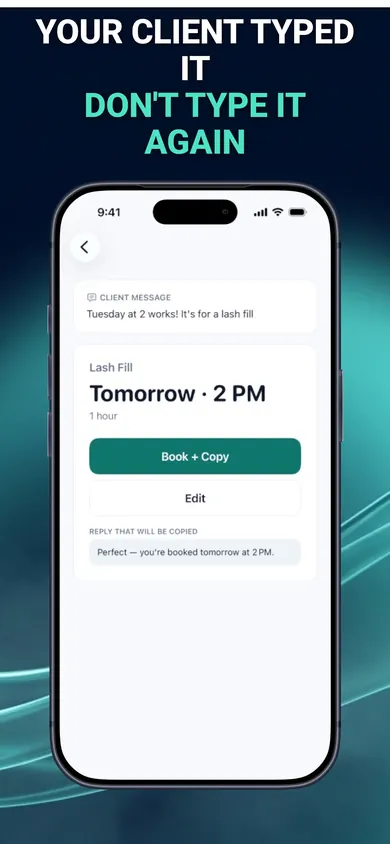
We make BookingSolved for the "at booking" step. A client texts "Can Bella come in Tuesday at 2?" You paste the text, choose a screenshot or use the Share Sheet, and it finds the service, date and time on your iPhone, checks your Apple Calendar, and prepares the appointment. Nothing changes in your Calendar until you approve it. The confirmation reply is editable in a Friendly, Professional or Concise tone, so you can add your two policy sentences before you send it yourself.
The client's text becomes a booking you approve.
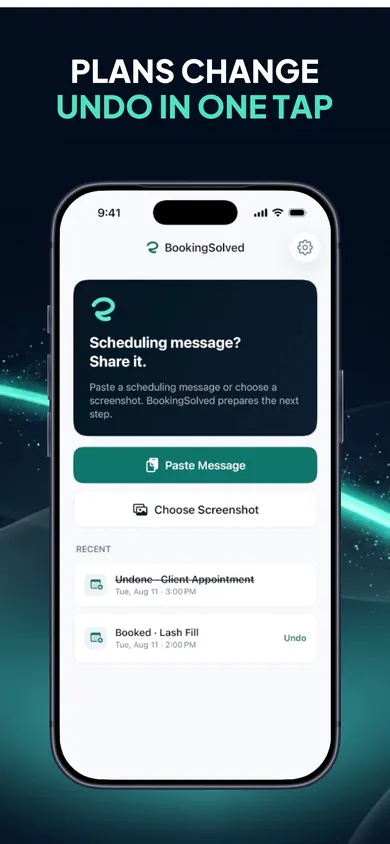
Cancellations show the exact event first; Undo is free.
Policy step
What BookingSolved does
At booking
Prepares the appointment and an editable confirmation reply.
Groom length
Each service has its own duration and prep or travel buffer you set.
Reschedules
"Can we move it an hour later?" shows a before-and-after preview first.
Deposits, reminders
Not handled. It takes no payments and never contacts clients.
The design decision: no booking portal and no connected inbox. Clients keep texting you the way they already do, requests are processed on your device, and Apple Calendar stays your source of truth.
Honest limits. BookingSolved doesn't collect deposits, charge no-show fees or send reminders, and it stores no prices. Your first 3 completed actions are free; BookingSolved Pro, a monthly or yearly subscription, covers unlimited bookings, reschedules and cancellations. Pick something else if you want clients to pay a deposit when they book: an online booking page with card capture fits that better.
Put the policy in every confirmation
Copy your policy above, then paste the next booking text you get. Your reply is ready to edit before you send it.
Free on iPhone · Start on your iPhone
More free tools and guides
How much should a no-show fee be?How much should a no-show fee be? Most solo pros charge 25–50% for late cancels and up to 100% for no-shows. Find the fair number for your service.
Personal trainer cancellation policy7 mistakes that make a personal trainer cancellation policy fail, and the fix for each. Tick them off, see the yearly cost, and copy your policy.
Cleaning business scheduling checklist12 checks to run before you text a cleaning client "you're booked", plus a day planner that shows how many jobs really fit once you add buffers and drives.
How to schedule tutoring sessionsHow to schedule tutoring sessions by text without double booking: buffers, after-school slots, cancellations and reschedules, plus a free slot planner.
 Solo Work Tools