 Solo Work Tools
How do you help an elderly parent cancel subscriptions?
Sit down together with the last three bank and card statements, list every repeating charge, price each one by the year, and let your parent decide what stays. Then cancel each one through the place it was bought, such as Apple, the company's website or a phone line, and save proof.
The order matters. Starting with "what you're wasting" makes most people defensive; starting with "what do you actually use?" keeps it their decision. Apple's own cancellation guide adds a practical limit: you can't cancel a family member's subscription for them; the person whose Apple Account is on the receipt has to do it, so your parent's phone needs to be in the room.
Their money, their call: you bring the list and the yearly totals, they make each decision.
Find every charge
Three months of statements catch monthly charges; scan a full year for yearly renewals like antivirus or magazines.
Price it by the year
$9.99 a month sounds small. $119.88 a year is a clearer question: "is this worth $120 to you?"
Cancel through the right door
App Store subscriptions cancel in Settings › your name › Subscriptions. Others cancel on the company's site or by phone. Write down confirmation numbers.
Check it worked
Look at the next statement. If a cancelled service still charges, call the company, then dispute it with the card issuer.
Questions families ask
Can I cancel my parent's Apple subscriptions from my phone?
What if a company keeps charging after we cancel?
Is there a law that makes cancelling easy?
How do we spot yearly renewals?
Should I take over my parent's accounts?
Who should use something other than MoneyShield
- Families who want charges found automatically. MoneyShield has no bank connection and no email scanning. You type each subscription in from the statement. That is the privacy trade-off we chose.
- Parents without an iPhone. MoneyShield lives on one iPhone. A paper copy of the worksheet below works anywhere.
- Anyone wanting a service to cancel for them. MoneyShield does not cancel subscriptions, request or guarantee refunds, or give financial advice. It points to the official cancellation route and gives a checklist and request templates.
Honest note on cost: MoneyShield starts with 7 days of Full Protection with no payment required, then moves to the free plan automatically. Plus is $3.99 a month, $24.99 a year or $59.99 once (U.S. prices) for unlimited subscriptions, early alerts and the full Cancel First ranking.
The sit-down worksheet
Fill this in at the kitchen table. Add each charge, its price and how often it bills; tap Keep, Not sure or Cancel. Totals update as you go, and Print gives you a clean copy to leave on the fridge.
Estimates from the prices you enter. Nothing leaves this page.
Keeping the list going after today
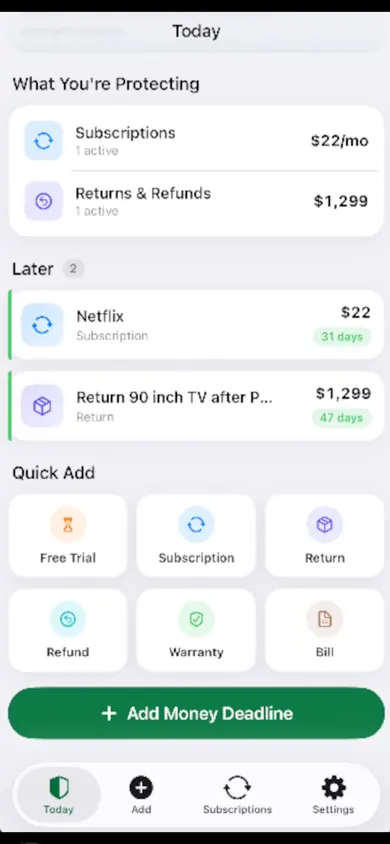
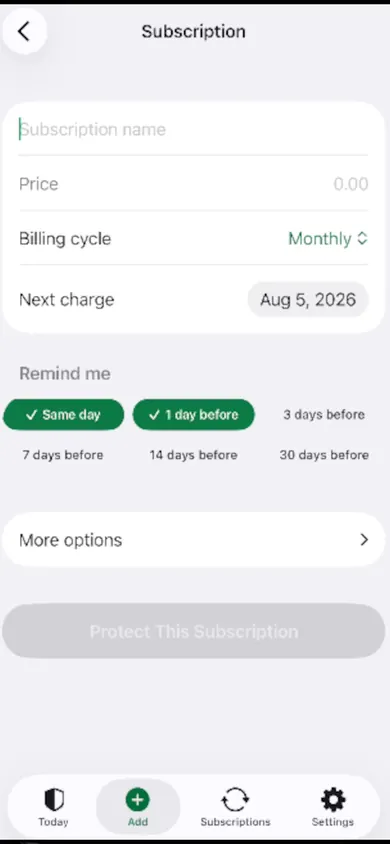
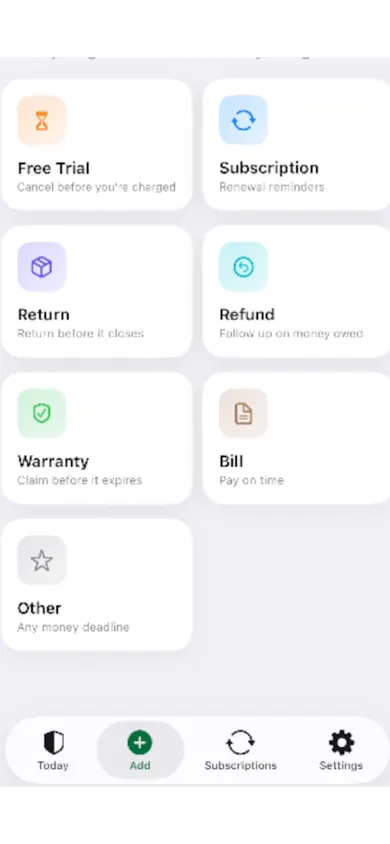
One sitting clears the backlog; reminders keep it clear. These are MoneyShield's App Store screenshots: the Today screen, the subscription form with reminder choices, and the deadline types it tracks.
| Doing it by hand | With MoneyShield |
|---|---|
| Paper list on the fridge | Private list on one iPhone, with backup file |
| You remember renewal dates | Renewal, trial and cancel-by reminders |
| Proof in a drawer | Confirmation number, paid-through date, screenshot and notes |
The paper worksheet is enough for one afternoon; reminders are what stop next year's surprise renewal.