 Solo Work Tools
When should you cancel a free trial?
Cancel an App Store free trial at least 24 hours before it ends. Apple's support page, published September 2026, says: "If you signed up for a trial subscription and you don't want to renew it, cancel it at least 24 hours before the trial ends." For trials outside the App Store, follow that company's own terms and cancel early.
The 24 hours is the part people miss. A 7-day trial that started Tuesday at 8 p.m. doesn't give you until the following Tuesday at 8 p.m. to decide. It gives you until Monday at 8 p.m. Leave it to the last evening and the renewal can already be in motion.
The safe deadline is the day before the trial ends, not the day it ends.
How to cancel a trial on iPhone
- Open Settings and tap your name.
- Tap Subscriptions.
- Tap the trial you want to stop.
- Tap Cancel Subscription (you may need to scroll).
That's straight from Apple's cancellation guide. If there's no Cancel button, or you see an expiration message in red, it's already cancelled. Deleting the app does not cancel anything: Google's Play Help says the same for Android, "When you uninstall the app, your subscription won't cancel" (Google Play Help).
Who doesn't need a cancel-by reminder
If you've already decided to keep the app, there's nothing to do; the trial rolls into the plan you chose. If you cancel every trial the minute you start it, you're covered too, as long as the service lets you keep the trial after cancelling (some do, some end access at once, so read the screen before you tap). Everyone else, which is most of us, needs a date written down.
How MoneyShield tracks free trial end dates
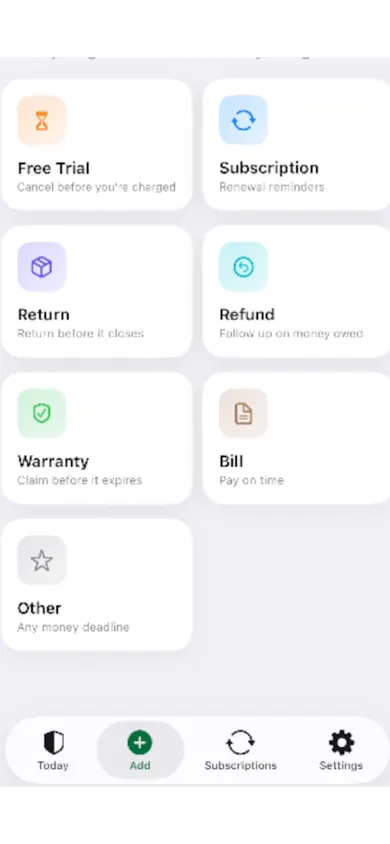
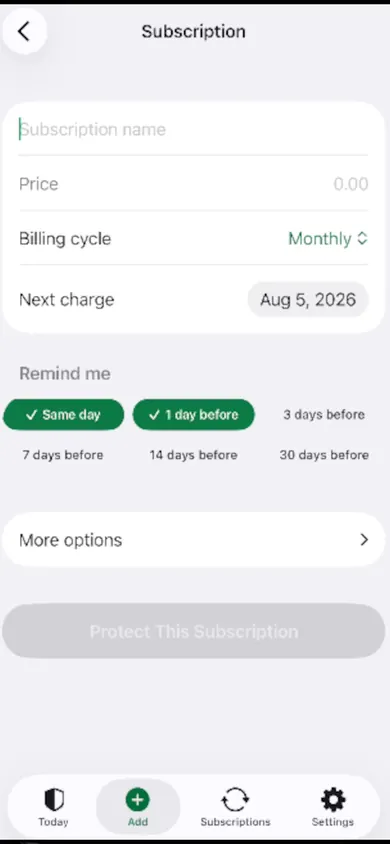
We built MoneyShield around money deadlines, and a free trial is the first one on its Add screen, labelled "Cancel before you're charged." You enter the name, price, billing cycle and next charge date, then pick reminders: same day, 1, 3, 7, 14 or 30 days before.
Free trial cancel-by date calculator
Put in when your trial started and how long it runs. You get the end time, the 24-hour cancel-by time, a reminder a day before that, and what the plan costs per year if you forget.
- Trial ends
- –
- Cancel by
- –
- Set a reminder
- –
- Cost per year
- –
Uses your device's time zone. Times are estimates: check the exact end time in Settings › your name › Subscriptions, which shows when the trial renews. Nothing is saved.
Example: a 7-day trial started Wednesday, November 4, 2026 at 8:00 p.m. ends Wednesday, November 11 at 8:00 p.m. Cancel by Tuesday, November 10 at 8:00 p.m.; set the reminder for Monday evening. At $9.99 a month, forgetting costs $119.88 a year.
Free trial questions
Can I cancel a free trial on the last day?
For App Store trials, Apple says to cancel at least 24 hours before the trial ends. On the last day you may already be inside that window, so treat the day before as your real deadline.
Will I lose access if I cancel a trial early?
It depends on the service. Some let you finish the trial after cancelling and some end access straight away. Read the confirmation screen, and if access matters, cancel a day or two before the cancel-by time instead of on day one.
What if I was charged after a trial I meant to cancel?
Contact the company first. The FTC's consumer advice says that if a company won't refund an unauthorized charge, you can dispute it with your card company, and you should keep copies of your requests and notes.
Does deleting the app cancel the trial?
No. App Store trials and subscriptions belong to your Apple Account, so cancel them in Settings, then your name, then Subscriptions.
Honest limits
MoneyShield never sees your App Store purchases. It has no account, no bank connection and no email scanning, so it only knows about a trial when you add it. That's the design decision: everything stays on your iPhone. It doesn't cancel trials for you and doesn't request or guarantee refunds; its Cancellation Assistant points you to the official route and gives you a checklist.
MoneyShield itself starts with 7 days of Full Protection, no payment required and no charge when the 7 days end. You move to the free plan automatically. Plus adds unlimited deadlines and early alerts up to 30 days ahead.
Pick something else if you want an app that finds trials for you by reading your bank or inbox. MoneyShield deliberately doesn't.
Ways to remember a trial end date
| Method | Works well | Watch out for |
|---|---|---|
| Cancel right away | No reminder needed | Some services end access immediately |
| Calendar event | Free, already on your phone | You do the 24-hour math yourself |
| Settings › Subscriptions | Shows App Store renewal dates | Doesn't remind you; misses web sign-ups |
| MoneyShield (ours) | Trial, cancel-by and follow-up reminders together | Manual entry, by design |
The FTC's advice on free trials (September 2024) says to read the terms before you sign up and to set a reminder for the cancellation deadline. Whichever method you choose, write the date down the moment the trial starts.
Never miss a cancel-by date
Add your trial with its end date and reminders in under a minute. No account, no bank login.
More free tools and guides
- The 7-day subscription detoxA free 7-day subscription detox: find every recurring charge, price it by the year, cancel the right way and set a monthly check. Beginner-friendly.
- How to audit family subscriptionsHow to audit family subscriptions in one sitting: list every plan by person, spot what you pay for twice, and see the yearly total. Free worksheet.
- Student subscriptions after graduationStudent discounts on Spotify, Apple Music and Prime Student switch to full price after graduation. Take the 3-question check to see when and how much.
- Cleaning business scheduling checklist12 checks to run before you text a cleaning client "you're booked", plus a day planner that shows how many jobs really fit once you add buffers and drives.