
Solo Work Tools7-day plan

The 7-day subscription detox

Cancelling isn't hard. Noticing is.

For freelancers with work and personal subscriptions on one card. One small job a day, seven days.

Download on the App StoreFree on iPhone

Updated November 2026 · By the Honest Little Apps studio · 6-minute read, 15 minutes a day

What is a subscription detox?

A subscription detox is a short, planned review where you list every recurring charge, work out what each one costs per year, and cancel or downgrade the ones you would not sign up for again today. Done over seven days, it takes about 15 minutes a day and ends with a monthly check so the list stays short.

People who work for themselves have it harder. The design tool, the invoicing app, the cloud storage and the streaming service often sit on the same card, billed on different days and different cycles. A weekly charge hides well. So does a yearly renewal that last appeared eleven months ago.

The goal isn't to cancel everything. It's to choose every charge on purpose.

The 7-day subscription detox plan

Each card is one day. Tick it when you're done; your progress stays on this page in this browser only.

0 of 7 days done
  1. Day 1 · Gather

    List what Apple bills you for

    On iPhone, open Settings, tap your name, then Subscriptions. Apple's cancellation guide (published September 2026) lists those exact steps. Write down every active one, and search your email for Apple receipts in case a second Apple Account is paying for something.

  2. Day 2 · Dig

    Read two months of statements

    Most recurring charges never touch the App Store: software billed by the company, gym memberships, phone add-ons, domain renewals. Scan two full months of card and bank statements and add anything that repeats. Check the business card too, not just the personal one.

  3. Day 3 · Price it

    Turn every charge into a yearly number

    Monthly prices feel small. Yearly prices are honest. Add each charge below and the tally does the multiplying: weekly × 52, every two weeks × 26, monthly × 12, quarterly × 4, every six months × 2.

    ChargePer yearPlan
    Nothing yet. Add your first charge, or
    All charges, per year$0.00
    Marked to cancel, per year$0.00

    Estimates from the prices you type. Nothing is saved or sent anywhere.

  4. Day 4 · Sort

    Keep, review later, or cancel

    Ask two questions of each line: did I use this in the last 30 days, and would I sign up today at this yearly price? Two yeses means keep. Two noes means cancel. A split means set a review date. Work tools you bill clients for usually stay; duplicates (two cloud drives, two music apps) usually go.

  5. Day 5 · Cancel

    Use the official route, and keep proof

    App Store subscriptions cancel in Settings. Everything else cancels through the company's own account page or support. The FTC's consumer advice on auto-renewals (September 2024) says to follow the company's cancellation instructions, keep a copy of your request and notes, and watch your statements afterwards.

  6. Day 6 · Guard

    Put dates on trials and yearly renewals

    For every trial, write the cancel-by date, a day early. For every yearly plan, set a reminder a week or two before it renews and check the renewal price, since the FTC notes promotional rates can end. For business tools, save the receipts: the IRS says supporting documents should show the payee, amount, proof of payment and date (IRS recordkeeping page, reviewed August 2026).

  7. Day 7 · Check

    Confirm, then book the next review

    Look for any charge from something you cancelled. If one appears and the company won't refund it, the FTC says you can dispute it with your card company. Then pick one day a month for a ten-minute review. That one habit keeps the detox from needing a sequel.

Who should skip this plan

Honest limits of MoneyShield

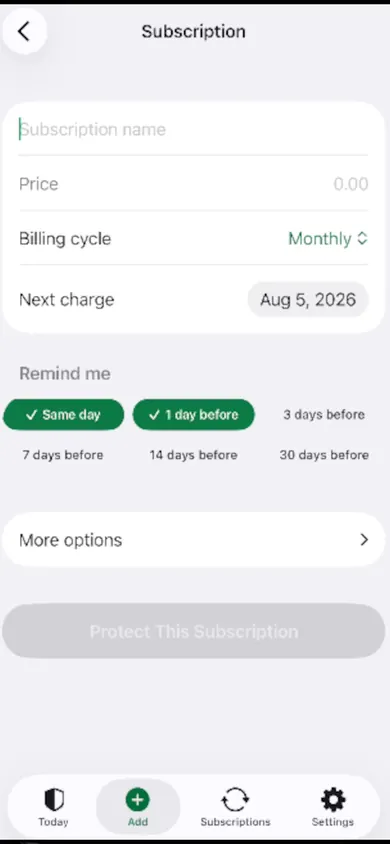
MoneyShield's add-subscription screen with price, billing cycle, next charge date and reminder options

We built MoneyShield to run Day 6 and Day 7 for you: renewal, trial, cancel-by and follow-up reminders, a 30-day charge timeline, and a guided monthly review, one subscription at a time. The design decision we'd defend: no account, no bank login, no email scanning. Everything stays on your iPhone.

The trade-offs are real. It does not cancel anything for you, request refunds or give financial advice, and savings figures are estimates from the prices you enter. The full Cancel First ranking, saved What If scenarios, exports and the receipt photo vault are part of MoneyShield Plus. You get 7 days of Full Protection with no payment required, then move to the free plan automatically.

Ways to run the detox, compared

Apple Settings

Free and exact for App Store charges. Shows nothing billed directly by a company.

Bank statements

Catches everything that hit the card. Slow to read, and it can't remind you before a renewal.

A spreadsheet

Flexible and free. You do the date math and remember to open it.

MoneyShield (ours)

Reminders, cancel-by dates and a monthly review on your iPhone. Manual entry, by design.

A familiar Sunday

A freelance illustrator sits down with two months of statements. The Apple list shows four subscriptions. The card shows nine recurring charges, including a font service from a finished client job, a second cloud drive and a $4.99 weekly app that works out to $259.48 a year.

She cancels three, writes a cancel-by date on one trial, and books the first Sunday of each month for a ten-minute review. This example is made up. The weekly-billing math is not.

Subscription detox questions

Does deleting an app cancel its subscription?

No. An App Store subscription is tied to your Apple Account, not to the app on your phone. Cancel it in Settings, then your name, then Subscriptions, as Apple's support page describes.

How long does a subscription detox take?

About 15 minutes a day for seven days. Day 2, reading statements, usually takes the longest. After that, a ten-minute monthly review keeps the list current.

What if I'm charged after I cancel?

Contact the company first with your saved confirmation. If it won't refund you, the FTC says you can dispute the charge with your card company and should keep copies of your letters, notes and emails.

Keep the list short after day 7

MoneyShield is free to download, works without an account and starts with a clearly labelled demo, so you can see it before adding a single charge.

Download on the App StoreFree on iPhone · Make it a habit with MoneyShield

More free tools and guides