 Solo Work Tools
How do you audit family subscriptions?
To audit family subscriptions, gather two months of statements for every card in the house, open the Subscriptions list on each family member's phone, then write every plan down by person with its billing cycle and price. Convert each to a yearly cost, mark anything the family pays for twice, and decide keep, share or cancel.
The step most families skip is the second one. App Store subscriptions belong to whoever bought them, so they don't all show up in one place. Apple's own guide to cancelling says "You can't cancel a family member's subscription"; the person whose Apple Account is on the receipt has to do it, from Settings, their name, then Subscriptions (Apple Support, reviewed November 2026). So the audit is a family conversation, not a solo spreadsheet.
Two people paying for the same music app is one of the easiest family budget leaks to find, and to fix.
Honest limits of a family audit
A one-evening audit finds what's on statements and phones today. It won't find a yearly renewal that billed eleven months ago, a plan paid by a grandparent, or a charge on a card nobody mentioned. Do it twice a year, and line up the second pass right after the holidays when gift trials quietly convert.
The duplicate flag in the worksheet below compares the category you choose. Two "video" plans can be on purpose (different shows, different people). Treat a flag as a question to ask, not a mistake.
Family subscription audit worksheet
Start from our sample family or clear it and enter yours. Yearly cost uses 52 weeks, 26 fortnights, 12 months, 4 quarters, 2 half-years. Nothing leaves this page.
Sample family, worked out: eight plans cost $856.86 a year ($71.41 a month). Music, video and cloud storage are each paid twice, and those six plans add up to $641.39 a year. A $2.99 weekly game pass alone is $155.48 a year.
Family subscription questions
Can I see my kids' App Store subscriptions?
Each person's subscriptions live in their own Apple Account, under Settings, their name, Subscriptions. Sit down with each child's phone. Apple says you can't cancel a family member's subscription for them; they have to do it from their account.
Is a family plan always cheaper?
Not always. A family plan usually beats two or more individual plans, but it can cost more than one individual plan plus a student plan. Compare the yearly totals before switching.
What if a company won't let us cancel?
The FTC's advice is to follow the company's own cancellation steps, keep a copy of your request, and if you still can't cancel, call your credit card company and ask them to stop the payments. It also says to check your statements for charges after you cancel.
How often should a family audit subscriptions?
Twice a year is a good rhythm, plus a quick look whenever a free trial starts. A monthly two-minute check of the next charges catches most surprises.
Keeping the list after tonight
A worksheet is a snapshot. MoneyShield, which we make, is the place to keep the household list on your iPhone afterwards: monthly and yearly totals, a 30-day charge timeline, renewal and trial reminders, and a Cancel First list ranked with a reason for each. It supports weekly, every 2 weeks, monthly, quarterly, every 6 months, yearly and custom billing.
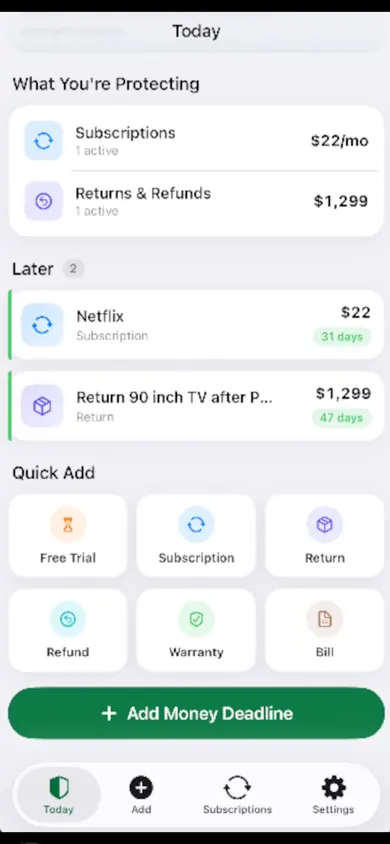
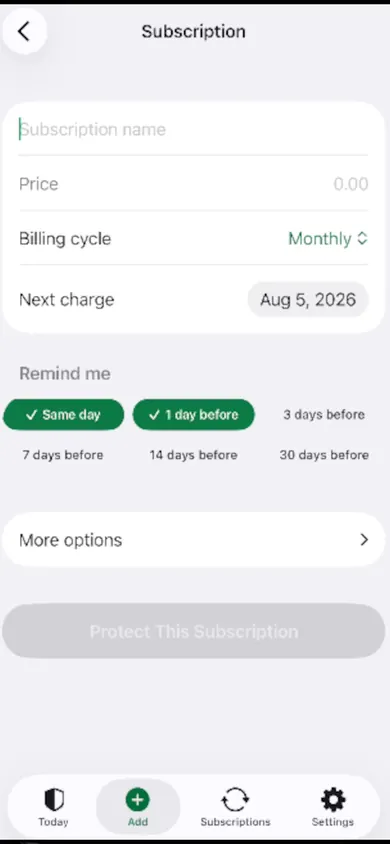
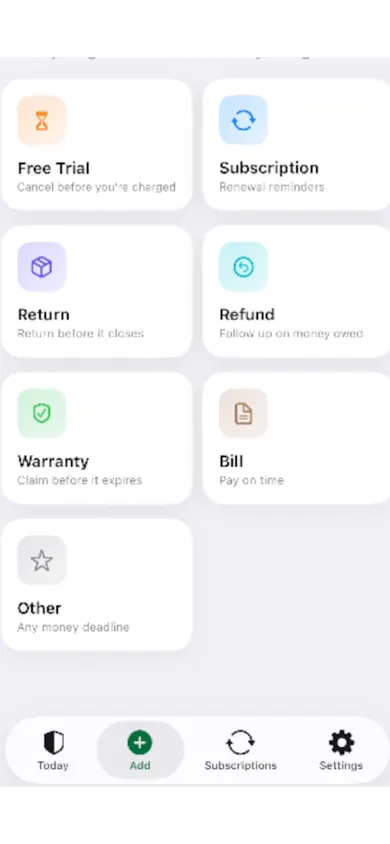
The design decision: no account, no login, no bank connection and no email scanning. Everything stays on your iPhone, with a backup file you create when you like. That's why it can't auto-discover charges: you add them, which is exactly what this audit gives you.
Who should pick something else
- Families who want one shared list on every phone. MoneyShield keeps data on one iPhone with no shared account, so one person keeps the household list. A shared spreadsheet may suit you better.
- Anyone who wants charges found automatically. MoneyShield never connects to your bank. A bank-linked budgeting service will detect charges, in exchange for access to your accounts.
- Anyone who wants an app to cancel for them. MoneyShield points you to the official cancellation route with a checklist and templates; it doesn't cancel subscriptions or request refunds for you.
How it works in 3 steps
- Add each plan from tonight's worksheet: name, price, billing cycle and next charge date. Monthly and yearly totals are marked as estimates.
- Review one at a time with the guided monthly review: Keep, Review Later, or start cancelling.
- Cancel with a record: the Cancellation Assistant points to the official route, and you keep the confirmation number, paid-through date and a follow-up reminder.
MoneyShield starts with 7 days of Full Protection, no payment required, then moves to the free plan automatically. MoneyShield Plus is optional: $3.99 a month, $24.99 a year or $59.99 one time (United States prices; they may vary by region).
Keep the list past tonight
Add your family's plans once and get reminders before the next charge. No bank login, no account.
More free tools and guides
- The 7-day subscription detoxA free 7-day subscription detox: find every recurring charge, price it by the year, cancel the right way and set a monthly check. Beginner-friendly.
- When to cancel a free trialCancel an App Store free trial at least 24 hours before it ends. Enter your start date and get your exact cancel-by time, reminder and yearly cost.
- Student subscriptions after graduationStudent discounts on Spotify, Apple Music and Prime Student switch to full price after graduation. Take the 3-question check to see when and how much.
- Cleaning business scheduling checklist12 checks to run before you text a cleaning client "you're booked", plus a day planner that shows how many jobs really fit once you add buffers and drives.