 Solo Work Tools
How to run a holiday subscription audit
A holiday subscription audit takes about 20 minutes: list every trial, deal and plan you started between Black Friday and New Year, write the date each one first charges full price, and decide keep or cancel for each before that date. Do it in early December while the sign-ups are fresh, then check again in January.
Seasonal deals are built to be easy to start and easy to forget. The audit is just writing the dates down.
Cancel-by date finder
Enter each trial's start date and length. Black Friday is November 27, 2026, so a 30-day trial started that day runs to December 27. Apple says to cancel an App Store trial at least 24 hours before it ends, so the finder gives you a date one day earlier.
Trials end at different times of day depending on the service, which is why we pick the day before. Check each service's own terms.
A December, for example
Picture a household that, between Thanksgiving and Christmas, starts a 30-day streaming trial on Black Friday, a 14-day game pass for the kids' break, and a 90-day music deal on December 20. None of them feels like a decision; each is a single tap.
Tick all six items in the list at the top of this page and the yearly total reaches $854.51. Nobody plans to keep all six. The cost comes from the ones that renew while everyone is busy.
Three dates on a calendar are worth more than one big promise to "look at subscriptions in January".
Holiday subscription questions
When should I do a holiday subscription audit?
Twice: in the first week of December for Black Friday and Cyber Monday sign-ups, and in the second week of January for anything started over the holidays. Most 30-day trials from late November end in late December, when attention is elsewhere.
If I cancel a free trial early, do I lose access?
It depends on the service. Some keep access until the trial ends; others stop it right away. Read the cancel screen before you confirm. If access stops early, set a reminder for the day before instead.
What if a trial already charged me?
Cancel it now so it doesn't renew again, then ask the company about a refund. If a charge was a billing error, the CFPB says to send your card company a dispute within 60 days after it appeared on your statement.
Do companies have to remind me before a renewal?
Rules vary by state. California's automatic renewal law, updated July 1, 2025, requires an annual reminder and cancellation through the same channel you signed up with. There is no federal click-to-cancel rule in force; the FTC reopened rulemaking in March 2026.
Should I switch to an annual plan for the discount?
Only for something you used every week this year. Annual deals in December lock in twelve months on a holiday mood. Price it by the year and compare it with how often you actually opened it.
What this can't do
The list at the top uses example prices. Real prices vary, so enter your own. The cancel-by finder counts calendar days from the start date you enter and can't see a service's exact cut-off time.
Design decision: MoneyShield has no bank connection and no email scanning, so nothing is read without you. Honest limit: it only knows about subscriptions you add, and it does not cancel them for you or request refunds. Savings figures are estimates based on the prices you enter.
Inside MoneyShield
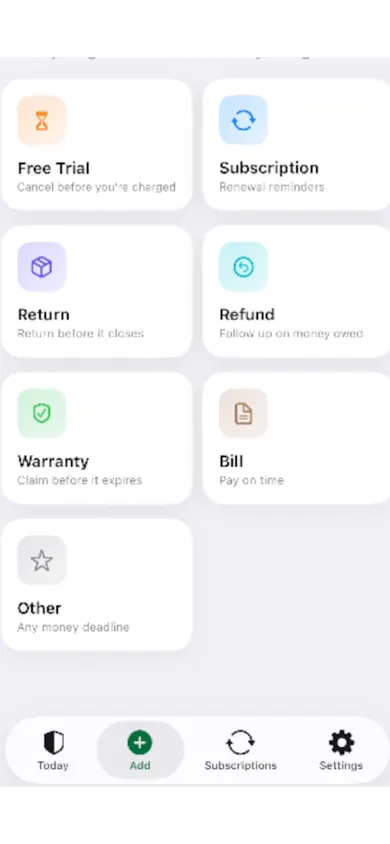
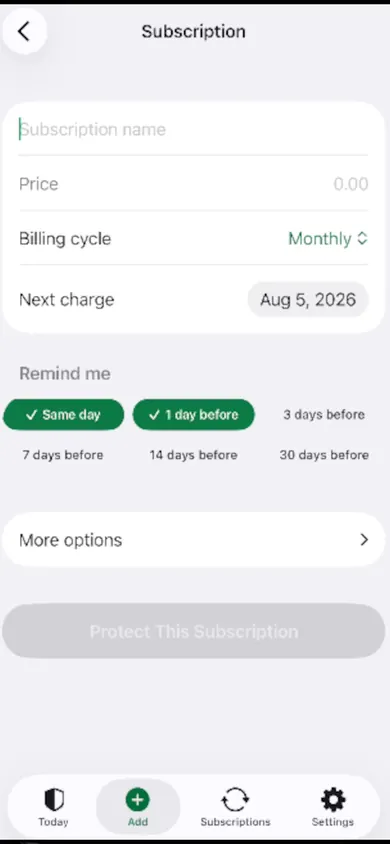
Trial end dates and cancel-by dates sit on a 30-day charge timeline. Returns, refunds and warranties from holiday shopping go in the same place, and a guided monthly review walks through one subscription at a time.
Who should skip it
If you want an app to find subscriptions for you from your bank statements, MoneyShield isn't that; it never connects to a bank. If you have two or three subscriptions and a paper calendar you trust, you probably don't need an app at all. The finder above is free and works on its own.
Three ways to keep track
MoneyShield is our app. Plus is $3.99 a month, $24.99 a year or $59.99 once (US prices), after 7 days of Full Protection with no payment required.
Put the dates somewhere that reminds you
Add each holiday trial with its cancel-by date. MoneyShield sends trial, renewal and cancel-by reminders before the charge, not after.
More free tools and guides
- The 7-day subscription detoxA free 7-day subscription detox: find every recurring charge, price it by the year, cancel the right way and set a monthly check. Beginner-friendly.
- Student subscriptions after graduationStudent discounts on Spotify, Apple Music and Prime Student switch to full price after graduation. Take the 3-question check to see when and how much.
- When to cancel a free trialCancel an App Store free trial at least 24 hours before it ends. Enter your start date and get your exact cancel-by time, reminder and yearly cost.
- Annual vs monthly subscription calculatorAnnual vs monthly subscription calculator: enter both prices and how long you'll really keep it. See the break-even month and which plan costs less.