 Solo Work Tools
A short letter to the contractor who said "sure, no problem"
You were halfway through a bathroom when the homeowner asked if you could "just swap the vanity light while you're here." You said yes, because saying no felt petty. Three weeks later the invoice is $393 higher than the quote, and the conversation is not friendly.
The work was fair. The paperwork was missing. This page fixes that in about two minutes per change.
How do you write a change order?
Write a change order before the extra work starts, listing four things: the work being added or removed, the price added or subtracted, the effect on payments or the finish date, and both signatures with a date. Keep it to one page, attach it to the original quote, and give the customer a copy.
That list isn't just good practice. California's home improvement law, Business and Professions Code § 7159.6, says a change order must state the scope of work, the amount added or subtracted, and "the effect the order will make in the progress payments or the completion date." The Contractors State License Board's guidance for contractors adds that any change to the original terms should be in writing, "This includes work that will not alter the contract price."
Change order steps, in order
- Stop and name the change. One sentence the customer would agree with: "Replace existing vanity light with customer-supplied fixture."
- Price it like a mini quote. Labor hours × your rate, materials with your markup, any trip or disposal cost. Example: 3 h × $75 + $140 materials × 1.2 = $393.
- Show what it moves. The new contract total ($4,850 + $393 = $5,243), and whether the finish date or a payment stage shifts.
- Get it signed before the work. On paper, by email reply, or an on-screen signature. Then do the work.
The best time to price extra work is before it exists; the second best is before it starts.
Change order builder
Fill it in, then copy the text into a message, email or your own form. It works offline in your browser and saves nothing.
Prices are before sales tax. Check your state's contract rules for anything extra it requires.
Six change order mistakes, and the fix for each
Doing it first, writing it later
Once the work is done, the price becomes a negotiation about something the customer can't un-buy.
"Misc. extras" as the scope
Vague scope is where disputes live.
Forgetting the schedule
Extra work usually means an extra day. If the date isn't on the change order, the old date still feels like a promise.
Pricing extras at cost
Small extras often get priced at materials only, as a favour. Three of those and the job's margin is gone.
Skipping free changes
"Same price, different tile" still changes the job. CSLB's guidance says written change orders include work "that will not alter the contract price."
Keeping changes off the invoice
If the invoice shows one lump total, the customer can't match it to what they approved.
Every fix above comes down to one habit: treat each change as a small quote with a signature.
Paper form, text message or app?
Paper form
Signed on site, nothing to install. Easy to lose, and the price is figured by hand.Text or email
Fast and dated. Fine for small changes if it states scope, price and date, and the customer replies yes.Spreadsheet
Good math, but rarely open on the ladder, and signatures live somewhere else.ScopeBid (ours)
Add extra work mid-job with its own price and profit impact, then invoice without retyping.Honest limits
- This is not legal advice. Rules on what a change order must contain differ by state; we quote California because its statute spells it out.
- The builder above prices labor and materials. It doesn't add sales tax or permit fees.
- ScopeBid records payments; it does not process cards or move money, and it isn't accounting software.
- If you work on large commercial contracts with formal change-order procedures, follow the contract's own process and forms.
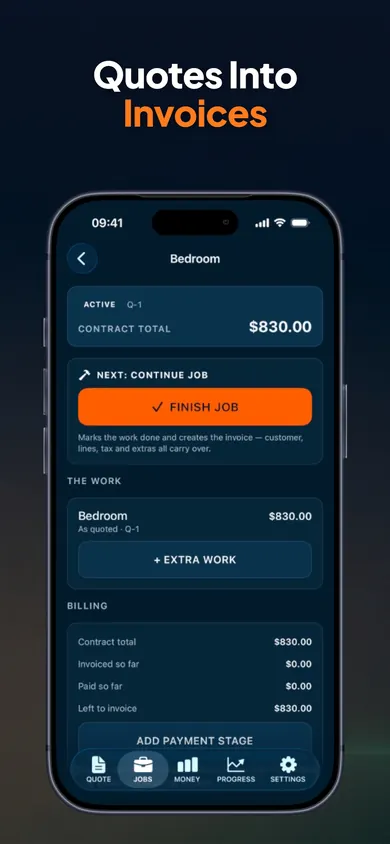
One design decision we made on purpose: internal cost and margin are never printed on customer documents, so your change order shows the price, not your profit.
Price the next "while you're here"
Add the extra work to the live job, see its profit impact, and turn the approved quote into an invoice without retyping. Your first 3 quotes are free, with full PDFs.
More free tools and guides
- Best estimate app for paintersBest estimate app for painters? We compared ScopeBid (ours), Joist and Paint Estimator Pro from their App Store listings, Nov 2026. Fair picks by job type.
- Estimate vs quote vs bidAn estimate is a best guess, a quote is a fixed price once accepted, a bid competes for a job. Tick 4 facts about your job to see which to send.
- How much deposit should a contractor ask for?Tie the deposit to materials you buy up front, then check your state's cap. California: $1,000 or 10%, whichever is less. Free deposit checker.
- How to bid a landscaping jobHow to bid a landscaping job without leaving money in the truck: tick six cost lines, watch the price change, then run your own job in the free calculator.